In this guide本指南目录
What is Delaunay triangulation什么是 Delaunay 三角剖分 Choosing triangle count如何选择三角形数量 Edge lines & seeds棱线与随机种子 Uses for low-poly art低多边形艺术的用途What is Delaunay triangulation
Low-poly art takes a photo and rebuilds it from triangles. The clever part is choosing where the triangles go. The Delaunay triangulation — named after the mathematician Boris Delaunay — connects a set of points so that no point falls inside any triangle's circumcircle. The result is the 'most balanced' possible triangulation: no skinny slivers, a clean mesh everywhere.
In this tool, points are sampled intelligently: areas with strong edges (faces, eyes, architectural lines) attract more points, while smooth areas (sky, skin, walls) get fewer. That's why a low-poly portrait still looks like a person instead of a jumble of random shapes.
Choosing triangle count
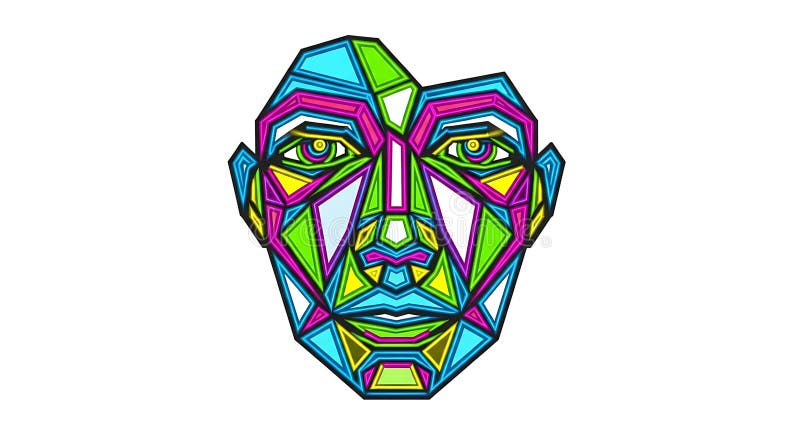
100–200 triangles: bold, abstract, almost cubist. The face becomes a mask of big planes. Best for posters where the geometry is the point.
300–450 triangles: the sweet spot. Features stay recognizable while the faceted texture reads clearly from across the room.
600+ triangles: fine detail — eyelashes, folds, text — but the low-poly magic gets subtler. Use it for small prints or when the photo itself is busy.
A good rule: the bigger the print, the fewer triangles you need, because distance hides the facets anyway.
Edge lines & seeds
Edge Lines draws the triangle borders. At 0, you get a smooth, stained-glass color mosaic. At 40–70, the wireframe shows through — the classic technical-illustration look. Low-poly artwork in 3D software usually has visible edges, so most people land around 30–50.
Random Seed changes the point distribution. Because the layout is random-but-weighted, every seed produces a genuinely different composition. For a series of posters from one photo, generate five seeds and pick your favorite — it's like hiring five different artists.
Pro tip: portraits look best at 300–400 triangles with light edge lines; landscapes shine at 150–250 with no lines at all, like a geometric sunset.
Uses for low-poly art
Low-poly is everywhere in modern branding: tech pitch decks, startup logos, album art, game UI, even architectural visualization. Because it sits at the intersection of photography and 3D design, it reads as modern instantly.
Try it on a city skyline for a poster, on a pet portrait for a funny-yet-cool gift, or on a product shot to make a brand deck stand out. The full-resolution HD export keeps the triangles crisp even at print sizes.
Troubleshooting: noise & artifacts
Two complaints dominate low-poly discussion: 'it looks like noise' and 'the edges are jagged'. Noise appears when the triangle count is too high for a small export — facets become tinier than the pixels, and the texture vanishes. Fix it by lowering the count. Jagged edges appear when triangles are too few and follow the silhouette poorly; raise the count, or keep Edge Lines on so the mesh reads as intentional.
Portraits are the hardest case: skin is smooth, so low counts work; hair is chaotic, so it eats triangles. Compromise around 300–400 and let the geometry do the talking.
From photo to game asset
Low-poly is the native language of indie games. A portrait or prop processed this way becomes a plausible game asset: flat shading, visible facets, clean silhouette. Export at 4× HD and downscale in your engine of choice; keep Edge Lines at 30–50 so the wireframe reads like a stylized model rather than a texture.
For UI icons and badges, drop to 80–120 triangles — the geometry should survive at 48 pixels.
Series workflow
One photo, five seeds, five posters — that's a cheap and fast series. When you find a seed you like, write down the settings; the same seed and count reproduce the same composition every time. This reproducibility is exactly what designers need when a client asks for 'the same style, more angles'.
Our export keeps full resolution, so each series member stays print-ready.
Frequently asked questions
What's the best triangle count for a profile picture? 150–250. A profile image is small, so a low count keeps the geometry readable instead of turning into pixel dust. For large posters, 300–450 gives the detail a bigger canvas deserves.
Can I use low-poly art as a logo? Yes — many modern logos use faceted geometry. Keep Edge Lines on, drop the count to 80–150, and export a simple, bold composition. Flat colors mean the design survives any reproduction method.
Why are my edges jagged at small sizes? Low-poly is inherently faceted; at small sizes the facets outnumber the pixels. Export at 2×–4× and view at actual size before judging — most 'jagged' complaints disappear at real print resolution.
Does the tool support transparent backgrounds? The effect fills the full frame with triangles, so the output is a complete image rather than an isolated subject. For transparent-outline work, pair it with Silhouette first, then process the silhouette through low-poly.
什么是 Delaunay 三角剖分
低多边形艺术把照片用三角形重建。巧妙之处在于三角形的放置位置。Delaunay 三角剖分——以数学家鲍里斯·德劳内命名——连接一组点,使得没有任何点落在任何三角形的外接圆内。结果是”最均衡”的剖分:没有细长的碎片,处处都是干净的网格。
本工具会智能采样:强边缘区域(人脸、眼睛、建筑线条)吸引更多点,而平滑区域(天空、皮肤、墙面)得到更少的点。这就是为什么低多边形肖像依然像一个人,而不是一堆随机形状。
如何选择三角形数量
100–200 个三角形:大胆、抽象、近乎立体主义。面部变成大平面构成的假面。最适合以几何本身为卖点的海报。
300–450 个三角形:最佳区间。五官保持可辨识,切面质感在房间另一头依然清晰。
600 个以上:细节精细——睫毛、衣褶、文字——但低多边形的魔法感变弱。适合小幅印刷或照片本身较复杂的场景。
一个实用法则:印刷尺寸越大,三角形越少越好——因为距离本来就会隐藏切面。
棱线与随机种子
棱线会画出三角形边框。0 时得到平滑的彩色玻璃式色块拼贴;40–70 时线框显现——经典技术插画质感。3D 软件中的低多边形作品通常可见棱边,所以大多数人会落在 30–50 之间。
随机种子改变点的分布。由于布局是”加权随机”的,每个种子都会产生真正不同的构图。想用一张照片做一系列海报,生成五个种子再挑选最喜欢的——就像同时雇了五位不同的艺术家。
专业提示:肖像在 300–400 个三角形加浅棱线时最好看;风景在 150–250 个三角形且完全无棱线时最出彩,如同几何日落。
低多边形艺术的用途
低多边形在现代品牌中无处不在:科技路演幻灯片、创业公司 Logo、专辑封面、游戏 UI,甚至建筑可视化。因为它处在摄影与 3D 设计的交汇处,天然给人现代的感觉。
试试城市天际线海报、宠物肖像礼物,或让产品图在品牌提案中脱颖而出。全分辨率高清导出即使在印刷尺寸下也保持切面锐利。
Troubleshooting: noise & artifacts
低多边形的两大抱怨:「像噪点」和「边缘锯齿」。噪点出现在小尺寸导出下三角形过多时——切面比像素还小,纹理消失。降低数量即可。锯齿出现在三角形太少、轮廓贴合不佳时;提高数量,或保留棱线让网格读作刻意设计。
肖像是最难的案例:皮肤平滑,低数量即可;头发混乱,会吃掉大量三角形。妥协在 300–400 附近,让几何说话。
From photo to game asset
低多边形是独立游戏的原生语言。这样处理过的肖像或道具可以成为合理的游戏资产:平直着色、可见切面、干净轮廓。用 4× 高清导出,再在引擎中缩放;棱线保持 30–50,让线框读起来像风格化模型而非贴图。
UI 图标与徽章则降到 80–120 个三角形——几何在 48 像素下仍要成立。
Series workflow
一张照片、五个种子、五张海报——便宜又快速的系列。找到喜欢的种子就记下参数;相同种子与数量每次都能复现同一构图。这种可复现性正是客户要求「同样风格、更多角度」时设计师所需要的。
我们的导出保持全分辨率,系列中的每一张都可随时印刷。
Frequently asked questions
头像的最佳三角形数量?150–250。头像尺寸小,低数量让几何保持可读,而不是变成像素尘埃。大幅海报用 300–450,细节才配得上更大的画布。
低多边形能做 Logo 吗?可以——许多现代 Logo 都用切面几何。保留棱线、数量降到 80–150、导出简单大胆的构图。平涂色意味着设计经得起任何复制方式。
为什么小尺寸下边缘锯齿?低多边形本质上就是切面;小尺寸下切面比像素还多。先用 2×–4× 导出再按实际尺寸查看——大多数「锯齿」抱怨在真实印刷分辨率下会消失。
支持透明背景吗?效果用三角形铺满整个画面,输出是完整图像而非抠出主体。要做透明轮廓,先用剪影工具,再对剪影跑低多边形。
Ready to try it yourself?想亲手试试吗?
Open the tools and turn your own photos into art — free, private, unlimited.
打开工具,把自己的照片变成艺术品——免费、私密、不限次数。