In this guide本指南目录
Why before/after works为什么前后对比有效 Five formats that perform五种高表现格式 The reveal technique揭示技巧 Building a series habit建立系列习惯Why before/after works
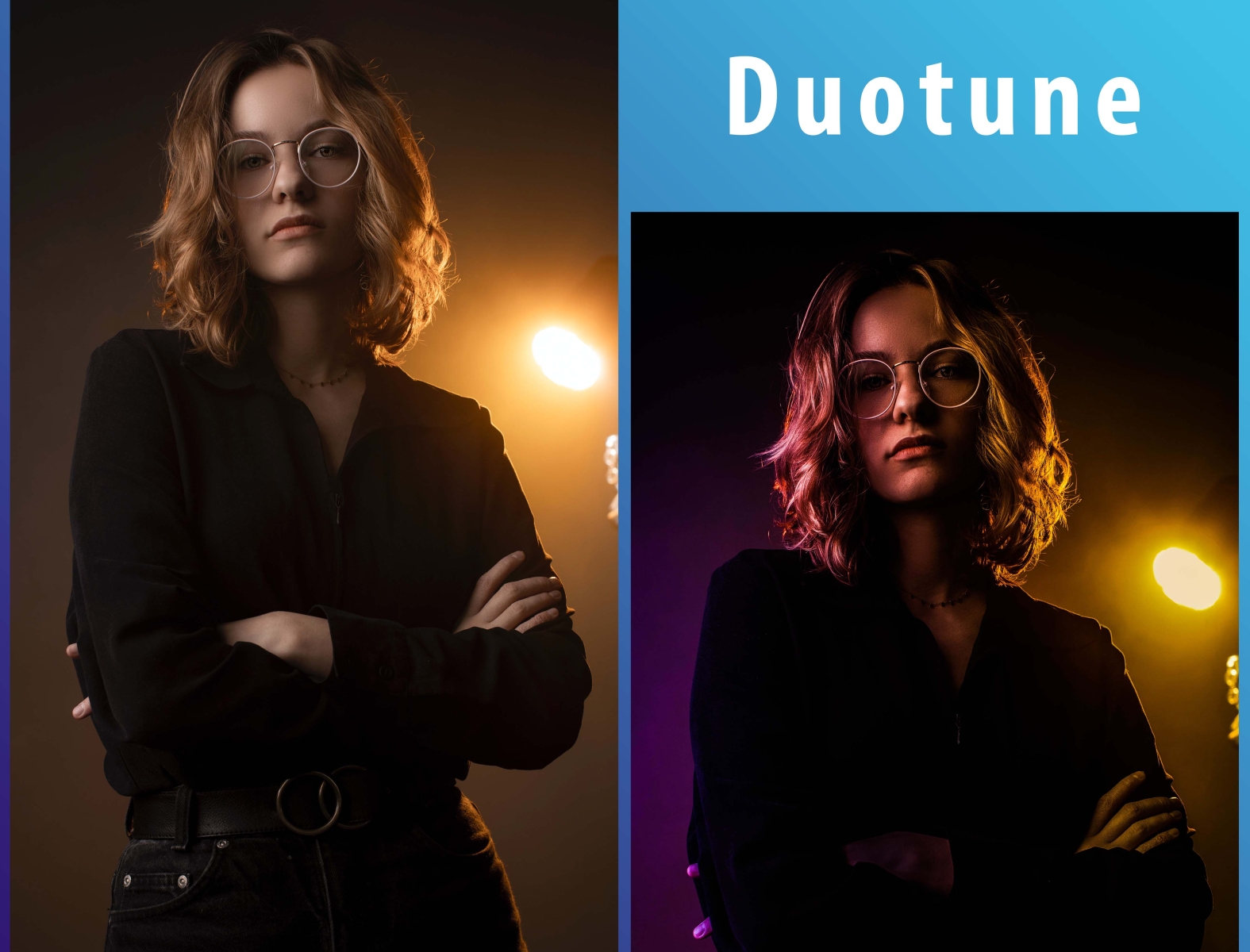
The before/after slider is the closest thing content platforms have to a guaranteed hook. It creates motion, tension and payoff inside a single static image. The viewer's finger drags, the photo transforms, and the brain releases a small reward: I did that.
It also works in both directions: for creators it's interactive (viewers drag it themselves), and for feeds it's scroll-stopping (the motion catches the eye). Few formats deliver both.
Five formats that perform
- The slow drag: drag the slider slowly across the face, hold on the 'after', cut.
- The grid: one photo, four effects, side by side — ask the audience to vote.
- The sequence: sketch → watercolor → pop art, three frames, one story arc.
- The reveal with reaction: film your genuine reaction to the result; the effect becomes the supporting actor.
- The tutorial: show the settings you used, then the result. Education + transformation = double retention.
The reveal technique
The payoff only lands if the 'before' is set up properly: show the original photo fully for a beat before the effect appears. Contrast is the engine — a boring original makes the transformation feel bigger. That's why portraits with flat lighting and busy snapshots become the best before/after subjects.
Then end on the 'after' alone, full-screen, for at least two seconds. Let the viewer admire it; that pause is where saves and shares happen.
Every before/after needs a villain: the original photo. If the original looks good, the transformation looks small.
Building a series habit
One viral video is luck; a series is a strategy. Commit to a weekly 'effect drop': pick a theme (faces, pets, food, cities), apply three effects, and post consistently. Over time, viewers associate your brand with transformation content, and each new drop inherits the audience's built-up attention.
The tools are free and unlimited, so the series costs you nothing but time — and every episode can link back to the free tool for the audience to try themselves.
Tools of the trade
A creator's before/after stack is smaller than you think: a camera (a phone suffices), a clean background, consistent lighting, and an effect tool that runs instantly. The discipline is what separates pros: shoot the same subject in the same light, apply the same settings, and let the transformation speak. The slider comparison built into each tool page is exactly the interactive element viewers love to drag themselves.
Metrics that matter
Watch watch-time on the reveal moment, save rate, and the share count. A before/after that people save is one they plan to recreate; a saved series becomes their content calendar. If watch-time drops mid-reveal, your 'before' setup is too long; if saves are low, the subject isn't relatable enough. Iterate on those two variables and the numbers move.
Repurposing across platforms
One before/after can feed every platform: a slider post for Instagram, a 15-second reveal for Shorts/Reels/TikTok, a static 'before and after' pin for Pinterest, a tutorial thread for X. The asset is one processed image plus its original — the packaging is what differs. Repurposing is the cheapest growth hack in the creator economy, and effect tools make the asset production instant.
Frequently asked questions
What if I have no audience yet? Before/after content works without one — the transformation is discoverable through hashtags and search. Post consistently with the effect name in the caption, and the algorithm finds viewers for the hook itself.
How long should a before/after video be? 7–15 seconds. Long enough for a full reveal, short enough to keep retention. Every extra second beyond the reveal point loses viewers — cut as soon as the payoff lands.
Can I use my own photos or should I use stock? Your own, always. Personal photos carry emotional context that stock can't fake — a parent's face, a beloved pet, a hometown street. The emotional layer is what makes the transformation matter.
Do I need editing software? No — the tools here generate the effects, the built-in slider demos the before/after, and your phone's camera roll handles the rest. The entire pipeline is browser-only, free and unlimited.
Does before/after work for non-photo subjects? Absolutely. Screenshots, designs, documents and artwork all make compelling transformations — a website redesign, a logo evolution, a drawing in progress. The rule stays the same: show the 'before', reveal the 'after', let the contrast tell the story.
为什么前后对比有效
前后对比滑块是内容平台最接近必杀钩子的东西。它在单张静态图片内部创造了运动、张力与回报。观者的手指拖动、照片转变、大脑释放小小的奖励:这是我做的。
它还双向有效:对创作者是互动(观看者自己拖),对信息流是刹停(运动吸引目光)。很少有格式能同时做到这两点。
五种高表现格式
- 慢速拖拽:沿脸部缓慢拖动滑块,停在「效果后」,切。
- 网格:一张照片、四种效果并排,请观众投票。
- 序列:素描→水彩→波普,三帧,一条故事弧。
- 反应揭示:拍摄你对结果的真实反应;效果成为配角。
- 教程:展示你使用的参数,再展示结果。教学+变身=双重留存。
揭示技巧
回报只有在「之前」铺垫得当时才会落地:在效果出现前完整展示原照片一拍。对比是引擎——平淡的原图让变身显得更惊人。这就是为什么平光肖像与杂乱快照成为最好的前后对比素材。
然后以「效果后」单独全屏收尾,至少停留两秒。让观众欣赏;这个停顿正是收藏与分享发生的地方。
每个前后对比都需要一个反派:原照片。如果原图已经好看,变身就显得渺小。
建立系列习惯
一条爆款视频靠运气;一个系列是战略。承诺每周一次「效果放送」:选一个主题(面孔、宠物、食物、城市),应用三种效果,持续发布。久而久之,观众把你的品牌与变身内容绑定,每一条新内容都继承累积的注意力。
工具免费且不限次数,所以这个系列只花时间不花钱——而且每集都可以链接回免费工具,让观众自己动手。
Tools of the trade
创作者的前后对比装备比想象中少:一台相机(手机就够)、干净的背景、一致的光线、一个即时运行的效果工具。拉开差距的是纪律:同一光线拍同一主体、应用相同参数、让变身自己说话。每个工具页内置的滑块对比,正是观众喜欢亲手拖拽的互动元素。
Metrics that matter
关注揭示时刻的观看时长、收藏率与分享数。被人收藏的前后对比,是观众打算复刻的那种;被收藏的系列会成为他们的内容日历。如果揭示中途观看时长下滑,你的「之前」铺垫太长;如果收藏低,对象不够有共鸣。迭代这两个变量,数字就会动。
Repurposing across platforms
一条前后对比可以喂饱所有平台:Instagram 滑块帖、Shorts/Reels/TikTok 15 秒揭示、Pinterest 静态「前后对比」图、X 教程帖。素材只有一张处理图加原件——差别在包装。复用是创作者经济中最便宜的成长手段,而效果工具让素材产出即时化。
Frequently asked questions
还没有粉丝怎么办?前后对比内容不需要粉丝也能起效——变身通过话题标签与搜索被发现。持续发布、把效果名写进文案,算法会为钩子本身找到观众。
前后对比视频多长合适?7–15 秒。足够完成一次完整揭示,短到保住留存。揭示点之后的每一秒都在流失观众——回报落地就立刻剪掉。
用自己的照片还是素材库?永远用自己的。个人照片带着素材库无法伪造的情感语境——父母的脸、心爱的宠物、家乡的街道。情感层正是让变身有意义的东西。
需要剪辑软件吗?不需要——这里的工具生成效果,内置滑块演示前后对比,剩下的交给手机相册。整条管线只靠浏览器,免费且不限次数。
前后对比适合非照片主体吗?非常合适。截图、设计、文档与画作都能做出有吸引力的变身——网站改版、Logo 演变、未完成的画作。规则不变:展示「之前」,揭示「之后」,让对比讲述故事。
Ready to try it yourself?想亲手试试吗?
Open the tools and turn your own photos into art — free, private, unlimited.
打开工具,把自己的照片变成艺术品——免费、私密、不限次数。